

A correct Spotify pre-save setup, in the sense that matters for playlist consideration, means submitting your unreleased track through Spotify for Artists at least 7 days before your release date with final audio, accurate metadata, and a tight editorial pitch. That’s the whole mechanism. Spotify’s own guidance sets the 7-day floor and confirms that pitching on time is also what routes your song into your followers’ Release Radar.
Here’s what needs to be true before you touch that form:
- Your distributor has already delivered the release, and it’s visible in Spotify for Artists with the correct UPC/ISRC and release date.
- Final audio and artwork are locked. No placeholder masters, no “final final v3” files.
- You’ve picked one focus track and written a short, specific pitch covering genre, mood, key instruments, location, and why this song, right now.
- You know Release Radar depends on timely pitching, and that a managed option like Intonality exists for artists who’d rather hand the curator relationships to someone who already has them.
Key Takeaways
A correctly executed Spotify pre-save setup means pitching your finished, metadata-accurate track through Spotify for Artists at least 7 days before release, backed by a specific, honest editorial pitch.
| Point | Details |
|---|---|
| Pitch 7 to 14 days out | Spotify requires a minimum of 7 days before release; 14 days gives room to fix distributor or metadata errors. |
| Lock prerequisites first | Confirm distributor delivery, correct UPC/ISRC, final audio, and Admin access before opening the pitch form. |
| Pick one focus track | Choose the song with the clearest playlist fit, not necessarily your personal favorite. |
| Write specific, factual pitch copy | Use real genre tags, concrete momentum, and cut any language that sounds like marketing hype. |
| Pair editorial pitching with curator outreach | Intonality sends personalized, genre-matched pitches to real curators and reports 4 to 11 placements per campaign on average. |
Table of Contents
- How To Set Up A Spotify Pre-Save Pitch The Right Way
- What To Prepare Before You Open Spotify For Artists
- Step-By-Step: Submitting Your Pitch Inside Spotify For Artists
- Best Practices For Writing A Pitch That Gets Read
- What Happens After You Submit The Pitch?
- Common Mistakes And A Pre-Pitch Checklist
- Connecting Your Pitch To Social Media Promotion
- Linking Your Distributor Release To Spotify Correctly
- Setting Up Your Pre-Release Link For Listener Engagement
- Fixing Common Spotify For Artists Pitch Problems
- Why Curator Relationships Still Matter Alongside Editorial Pitching
- A Faster Path To Genre-Matched Curator Placements
- Frequently Asked Questions
- Sources
How To Set Up A Spotify Pre-Save Pitch The Right Way
Most artists treat this as an afterthought squeezed in the week of release. That’s backward. The pitch is a curator-facing document, and curators, along with Spotify’s own editorial team, read dozens of these a day. Sloppy metadata or vague pitch copy gets a submission skipped, not flagged for review.
The standard industry term for what you’re doing is “editorial pitching” or “pre-release pitching.” “Pre-save setup” is the phrase most artists search for, but Spotify itself calls this pitching music to playlist editors, and that’s the term you’ll see inside Spotify for Artists. Both refer to the same process: getting your unreleased song in front of the people who decide what goes on Spotify’s flagship playlists.
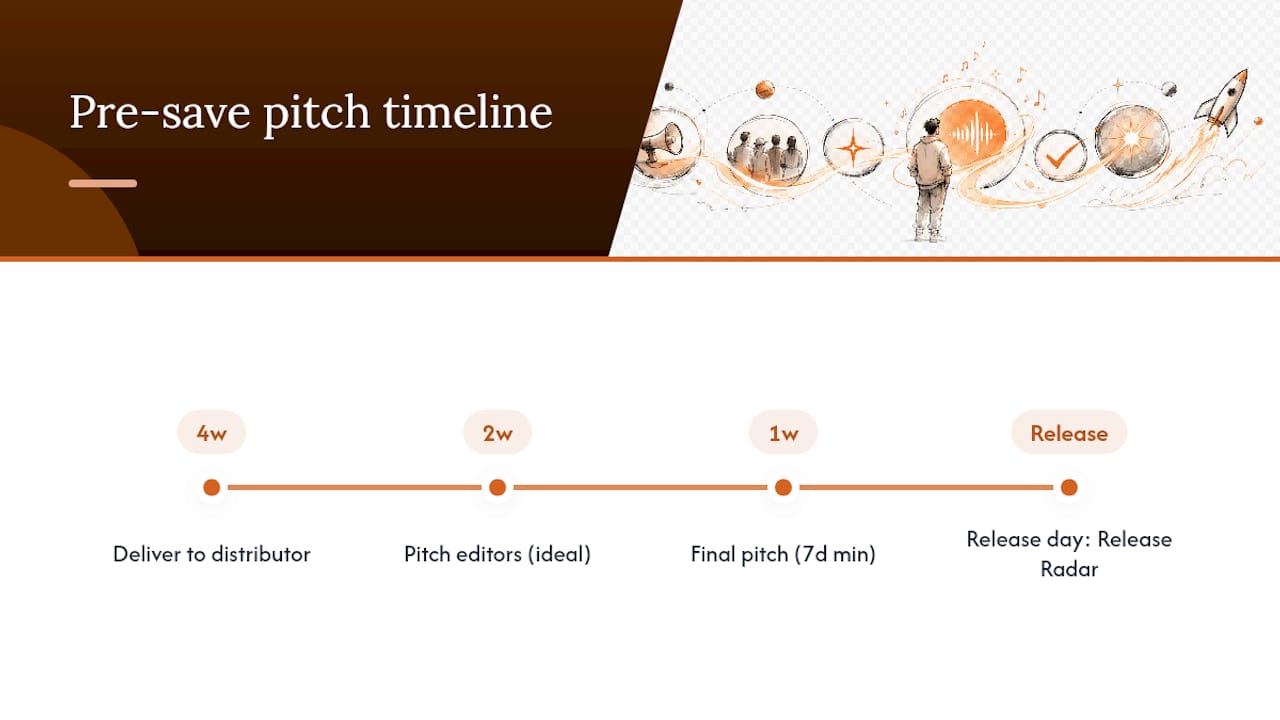
Timing is the single biggest lever you control. Spotify support states the pitch must land at least 7 days before release, and pitching earlier, ideally 2 to 4 weeks out, gives distributors time to process and gives editors more runway to actually review it. Miss that window and your song won’t populate Release Radar for existing followers on release day, regardless of quality.
What To Prepare Before You Open Spotify For Artists
Before you fill out a single field in the pitch form, get these pieces locked down. A rejected or invisible pitch almost always traces back to something on this list, not to the quality of the song.
- Spotify for Artists access: You need Admin or Editor permissions on the account, and your artist profile should be verified and current, including your photo and bio.
- Distributor delivery confirmed: Your release needs to show up under “Upcoming” in Spotify for Artists with the correct UPC/ISRC codes and release date. If it’s not there, the pitch form won’t work correctly.
- Final mastered audio and artwork: Uploaded to your distributor, matched to the metadata you’ll reference in the pitch. No last-minute swaps.
- One focus track selected: Spotify’s own playlisting guidance and most industry advisors agree: pitch the track with the clearest playlist fit, not necessarily your personal favorite or the one with the biggest chorus.
- Supporting context ready: collaborators, any existing momentum like upcoming shows or radio play, your location, and two or three honest genre and mood descriptors.
Distributors typically need 10 to 14 days to process delivery before a release becomes visible in Spotify for Artists, according to independent release-planning guides like UpNComer’s release checklist. Build that lag into your calendar or you’ll be scrambling the week you meant to pitch, following this practical, independent guide to pitch wording and timing.
Step-By-Step: Submitting Your Pitch Inside Spotify For Artists
Work backward from your release date. Distributor delivery goes out 21 to 28 days before release. You confirm visibility in Spotify for Artists 10 to 14 days out. You complete and submit the pitch at least 7 days before release, though 14 days gives you a much better safety margin if something needs fixing.
Here’s the actual sequence once you’re inside the platform:
- Open Music > Upcoming in Spotify for Artists and select the release you want to pitch.
- Choose your focus track. Spotify’s one-song-per-release rule means you get one shot per release, so pick the track with the clearest audience and the most obvious playlist home.
- Fill in genre tags. Use 2 to 3 real, searchable genres, not a stack of niche microgenres nobody curates for.
- Add mood and instrument descriptors. Be literal: “driving,” “melancholic,” “synth-led,” “acoustic guitar.” Editors use these to route songs, according to Spotify’s playlisting guidance.
- Enter location and culture context if it’s genuinely relevant to the song or your story.
- List collaborators (producer, featured artist, songwriter) so editors can trace connections to other placements.
- Write the story box. Two or three sentences: what the song is, why now, and any concrete momentum. No hype.
- Review and submit. Double-check the release date matches what’s on file with your distributor before you hit send.
Pro Tip: Draft your pitch copy in a separate document first, and have your manager, producer, or a bandmate read it before you submit. Cut any word that sounds like marketing copy. Editors respond to specifics: “played 40 shows across the Midwest this year” beats “rising star with a growing fanbase” every time.
If the release doesn’t appear in Upcoming, it’s almost always a distributor delivery delay or a mismatched release date. Fix that first. If you don’t see the pitch option at all, check that your account role is Admin or Editor. Viewer-level access won’t show the pitch form.
Best Practices For Writing A Pitch That Gets Read
Genre precision beats genre creativity. Editors search and filter by real tags, so “alt-pop” or “indie folk” will get you seen. Inventing a genre label because it sounds distinctive just gets your submission miscategorized or ignored.
- Use location and culture tags honestly. If you’re not actually connected to a scene or region, don’t claim it. Editors curating regional playlists check for this.
- Keep the pitch text to four things: what the song is, why it matters now, who it’s for, and any real, verifiable momentum.
- Line up your strongest 30 to 60 second hook with your promotional push. Early saves and repeat plays in week one are exactly what drives later editorial discovery even when the initial pitch doesn’t land a placement.
- Get collaborators posting native content the week of release instead of everyone just reposting the same flyer.
Pro Tip: If you played 12 shows this quarter or landed three prior independent playlist adds, say the number. A specific figure reads as evidence. A vague claim reads as filler, and editors have seen enough filler to spot it instantly. Independent curators running smaller playlists, generally in the 1,000 to 50,000 follower range, also tend to respond better to targeted, personalized outreach than to mass submissions, per Music24’s release-planning research. A resource like Intonality’s genre tag guide can help you settle on tags that are specific without being obscure.
What Happens After You Submit The Pitch?
Pitching at least 7 days ahead is what triggers Release Radar inclusion for your existing followers on release day. Aiming for 14 days, as advised by Artist Advisory’s editorial pitching guide, buys you a buffer if a distributor hiccup or metadata error needs correcting.
Don’t expect a reply. Spotify generally doesn’t send individual feedback on editorial pitches, so silence isn’t a rejection. It’s just the default. Check the Playlists tab in Spotify for Artists after release to see actual results.
Realistic outcomes fall into a few buckets:
- Release Radar inclusion for your existing followers (this is close to guaranteed if you pitched on time).
- An editorial playlist add, which is rare and high-impact when it happens.
- Independent curator placements, often the result of separate outreach.
- No immediate placement, with momentum building later if first-week listening holds up.
Treat the pitch as one piece of a release plan, not the entire plan. Clean, engaged first-week listeners matter more than most artists assume.
Common Mistakes And A Pre-Pitch Checklist
Run this before you submit:
- Distributor delivery visible in Spotify for Artists
- UPC/ISRC correct and matching your distributor records
- Final audio and artwork uploaded and locked
- Access confirmed as Admin or Editor
- One focus track selected
- Pitch copy drafted and reviewed by someone else
The most common failures: pitching after the 7-day window closes, mismatched release metadata, incomplete form fields, pitch copy full of hype instead of facts, and submitting a track that isn’t actually production-ready. Every one of these is avoidable with a calendar reminder set two weeks out.
Connecting Your Pitch To Social Media Promotion
Editorial pitching and social promotion aren’t separate tracks. They feed each other. The same story you tell Spotify’s editors, your genre, your hook, your momentum, should show up in your pre-release content so fans arrive primed to save and stream immediately.
Post your strongest 15 to 30 second clip on the platforms where your existing audience actually lives, not everywhere at once. If your pitch mentions a specific instrument or mood, let that be the thread in your captions too. Consistency between what editors read and what fans see builds a coherent signal.
Coordinate timing so your social push ramps up the same week your pitch goes in, not after. Early streaming activity, driven by fans who already know the release is coming, is one of the behavioral signals tied to post-release editorial discovery. A song that launches to silence gives editors nothing to react to even if the pitch itself was strong.
Get collaborators, labelmates, or your producer posting their own native content that week rather than just resharing your artwork. Multiple authentic posts from different accounts read very differently to an algorithm, and to human curators scanning for real momentum, than one artist repeating the same graphic five times.
Linking Your Distributor Release To Spotify Correctly
The pitch form only works if the technical chain behind it is intact. Your distributor, whether that’s DistroKid, TuneCore, CD Baby, or another service, sends metadata to Spotify that includes your UPC (for the release) and ISRC (for the individual track). If either code is wrong or missing, Spotify can’t match your release to your artist profile, and the pitch option may not appear at all.
Check that your Spotify for Artists profile is actually linked to the correct artist name on the release. This sounds obvious, but featured artists, name variations, and unclaimed profiles cause more delivery mismatches than almost anything else. Confirm under Music > Upcoming that the release shows the right title, release date, and track list before you go near the pitch form.
Release date accuracy matters more than artists expect. If your distributor lists a different date than what you’ve been promoting, or if you change the date after initial delivery, that can reset processing time and push your visibility window past the 7-day pitch deadline. Lock the date early and don’t touch it once delivery is confirmed.
If you’re using a distributor’s own pre-release page for fan-facing engagement alongside your Spotify for Artists pitch, make sure both point to the same release date and same track. Mismatched dates between fan-facing tools and your actual Spotify metadata create confusion that’s hard to untangle once fans have already interacted with the wrong version.
Setting Up Your Pre-Release Link For Listener Engagement
Once your distributor delivery is confirmed and visible in Spotify for Artists, most distributors let you generate a pre-release link tied to that Upcoming release. This is separate from the editorial pitch itself, but it runs on the same underlying delivery, so get the delivery right first.
- Confirm your release shows correctly under Upcoming in Spotify for Artists.
- Generate the pre-release link through your distributor’s dashboard, this process varies slightly by distributor, but the release must already have valid UPC/ISRC data.
- Test the link yourself before sharing it publicly. Confirm it opens to the correct release title, artwork, and date.
- Share the link through your usual channels, timed to align with the same week you’re ramping up social content.
- Monitor engagement through Spotify for Artists analytics once the release goes live to see how early activity is tracking.
Keep this process separate in your head from the editorial pitch timeline. The pitch has its own hard deadline of 7 days minimum. The engagement link can go live earlier, once delivery is confirmed, and generally benefits from more lead time, not less.
Fixing Common Spotify For Artists Pitch Problems
The pitch option doesn’t appear. This is almost always a permissions or delivery issue. Confirm you have Admin or Editor access, not Viewer. Then confirm the release is actually visible under Music > Upcoming. If it’s not there, contact your distributor before troubleshooting anything on Spotify’s side.
Metadata doesn’t match. If the release date, title, or artist name in Spotify for Artists doesn’t match what you submitted to your distributor, the pitch form may show stale or incorrect information. Fix the mismatch at the distributor level first since Spotify pulls from that data.
The form won’t submit or throws an error. Try a different browser or clear your cache. This is a common but usually simple fix. If the issue persists, check whether your release date has changed recently, since a late change can sometimes cause processing delays that affect form availability.
You submitted but the release date changed afterward. Once you’ve pitched, avoid changing the release date if at all possible. If a change is unavoidable, you may need to resubmit the pitch to reflect accurate timing, and you should not assume the old submission still counts. When in doubt, a step-by-step submission guide can help you audit each stage before you resubmit.
Why Curator Relationships Still Matter Alongside Editorial Pitching
Editorial pitching through Spotify for Artists is necessary, but it’s a single, algorithm-mediated door. Intonality exists because independent curators, real people running genre-specific playlists, respond to context that a form field can’t capture. Genre-matching and written feedback on every decision give artists something Spotify’s own process doesn’t: a reason when a pitch doesn’t land.
The average reported outcome runs 4 to 11 playlist placements per campaign, depending on tier, with real-time updates so artists aren’t guessing. DIY editorial pitching makes sense when you have the time and a genuinely strong story. A managed approach fits artists who want curator access and written feedback without building those relationships from zero.
A Faster Path To Genre-Matched Curator Placements
Editorial pitching through Spotify for Artists puts your fate in the hands of an algorithm and an anonymous editorial team who may never explain their decision. Intonality works differently: your song goes to real, vetted curators who already run playlists in your genre, and every decision comes back with written feedback, not silence.
That distinction matters if you’re an independent artist without months to spend building curator relationships one cold email at a time. Here’s what a campaign actually gets you:
- Personalized pitches sent to curators genuinely matched to your genre and sound
- Real-time updates on your campaign dashboard as decisions come in
- Written feedback on every curator response, whether it’s a yes or a pass
- Reported campaign results averaging 4 to 11 playlist placements, depending on the tier you choose
This runs alongside your Spotify for Artists pitch, not instead of it. You still submit to Spotify’s editorial team using the process outlined above. Intonality covers the independent curator layer at the same time, which is where a lot of real, durable playlist traction actually comes from. If you’d rather compare it against submission-credit platforms first, the Playlist Push alternative page breaks down the difference. When you’re ready, submit your track and see which curators are matched to your sound.
Frequently Asked Questions
How far in advance do I need to set up my Spotify pre-save pitch? Submit at least 7 days before your release date, per Spotify’s official guidance. Aim for 14 days if you can, since that buffer covers distributor delays or metadata fixes.
Can I pitch more than one song per release? No. Spotify’s pitch process is one focus track per release, so choose the song with the strongest, clearest playlist fit rather than splitting attention across multiple tracks.
What if my release doesn’t show up in Spotify for Artists? It’s almost always a distributor delivery issue or an access permissions problem. Confirm you have Admin or Editor access, then check with your distributor about delivery timing before assuming anything is broken on Spotify’s side.
Does Spotify tell me why my pitch wasn’t picked up? Generally, no. Silence is the default response, not a rejection notice. Check the Playlists tab in Spotify for Artists after release to see actual placement results instead of waiting for a reply.
Is a managed curator-pitch service worth it alongside Spotify’s own pitch tool? It depends on your time and existing curator access. A service like Intonality complements the Spotify for Artists pitch by adding genre-matched independent curator relationships and written feedback, which the Spotify process doesn’t provide on its own.
Sources
Start with Spotify’s own rules before relying on any secondhand summary, including this one.
- Pitching music and videos to Spotify playlist editors - Spotify
- Playlisting - Spotify for Artists
- How to Pitch Spotify Editorial Playlists and Improve Your Odds | Artist Advisory Guides
- Music24


