
A five-point vetting checklist is all you need to avoid fake playlists before you pay a cent or submit a single track. Check the follower-to-stream ratio, inspect the curator profile, review the growth pattern, test playlist coherence, and scan the description for payment language. Any one of those checks can expose a scam in under five minutes. Never pay for a guaranteed placement — Spotify’s official policy prohibits artificial streaming and allows the platform to withhold royalties, remove tracks, and penalize your distributor.
Here is the quick checklist before you go deeper:
- Follower-to-stream math: Sample three to five tracks. If per-track streams are far below the playlist’s follower count, something is off.
- Curator profile: No bio, no photo, no social links, and no other playlists? Walk away.
- Growth pattern: A playlist that jumps rapidly from a small to a very large number of followers in a short time without press coverage is a red flag.
- Playlist coherence: Fifteen indie folk tracks followed by ten reggaeton songs suggests a bot-assembled list, not a human curator.
- Suspicious text: Words like “promo,” “DM me,” or any mention of a fee for guaranteed placement are scam signals. Tools like artist.tools and Playlist Pilot can automate several of these checks.
Key Takeaways
Avoiding fake playlists comes down to one discipline: vet every playlist and every service before you pay, using follower math, curator identity checks, and bot-checker tools, because the consequences of getting it wrong range from withheld royalties to permanent algorithmic damage.
| Point | Details |
|---|---|
| Five-point vet before you submit | Check follower-to-stream ratio, curator profile, growth pattern, genre coherence, and description text. |
| No single signal is proof | Bot-checkers combine multiple indicators into a confidence score — one red flag warrants more checks, not an immediate verdict. |
| Fake streams damage your algorithm | Bot plays generate zero saves, which suppresses your track in Discover Weekly, Release Radar, and Radio. |
| Document and report fast | Screenshot everything, notify your distributor immediately, and file a Spotify report — early action limits royalty clawbacks. |
| Intonality’s curator-first model | Personalized pitches to vetted, genre-matched curators with written feedback on every decision and 4–11 placements per campaign on average. |
Table of Contents
- How to spot a fake Spotify playlist in five minutes
- Why fake playlists can seriously damage your career
- Which tools actually help you check a playlist’s legitimacy
- Practical steps to avoid being scammed by fake playlists
- What to do if your music is already on a fake playlist
- How to monitor your catalog and catch fake activity early
- What legitimate playlist promotion actually looks like
- Why curator quality matters more than follower counts
- Intonality connects you with real curators who give real feedback
- Sources
How to spot a fake Spotify playlist in five minutes
Spotting botted playlists is a skill, and it gets faster with practice. Work through these steps in order.
-
Run the follower-to-stream ratio check. Open the playlist and pick three to five tracks at random. Note each track’s total stream count in Spotify for Artists or on the public profile. A healthy playlist typically shows per-track streams that are at least in the same order of magnitude as the follower count. If a playlist has many followers but every track sits at a very low stream count, the followers are almost certainly fake. Musosoup’s hands-on guide walks through this exact method step by step.
-
Inspect the curator profile. Click the curator’s name. Look for a profile photo, a bio, social media links, and a history of other playlists. A real curator usually has a web presence you can verify independently. No photo, a one-line bio with no links, and a single playlist with 80,000 followers is a pattern worth treating as suspicious. Symphonic’s detection guide lists curator profile checks as one of the highest-value, lowest-effort verifications available.
-
Check the growth pattern. Search the playlist name in a tool like Chartmetric or SpotOnTrack. Legitimate playlists grow gradually, with occasional spikes tied to press coverage or social sharing. A vertical climb from a few hundred to tens of thousands of followers in a single week, with no corresponding media event, is a classic bot-inflation signal. Note: some drip-feed services spread fake adds over several weeks to mimic organic growth, so a smooth curve alone does not guarantee legitimacy.
-
Look at add timestamps and track diversity. If every song on a 60-track playlist was added on the same day, a human did not build that list over time. Pair that with genre incoherence — hip-hop, classical, and EDM all in one “chill vibes” playlist — and you have strong evidence of a bot-assembled collection.
-
Read the description and submission instructions carefully. Phrases like “submit your track for promo,” “DM for placement,” or any explicit fee mention are disqualifying. Legitimate curators do not promise placement in exchange for money. CyberPR’s guide for indie musicians flags description language as one of the clearest early signals.
-
Score your confidence. After running all five checks, assign a rough score: one point for each check that passes cleanly. A score of four or five means the playlist is probably legitimate. Three or below means you should either dig deeper with a bot-checker tool or skip the submission entirely.
Pro Tip: Screenshot the playlist page, the curator profile, and any suspicious text before you do anything else. If you later need to report the playlist or contact your distributor, that documentation is the first thing they will ask for.
Why fake playlists can seriously damage your career
The damage from fake playlists is not hypothetical, and it does not stop at wasted money.
- Withheld royalties. Spotify can remove artificial streams and withhold the associated royalties entirely. You may not know this happened until you notice a gap in your payout.
- Distributor penalty fees. When flagrant artificial streaming is detected, Spotify can charge the distributor, who may pass that cost to you. UnitedMasters’ FAQ on penalty fees and DistroKid’s support page both document this risk.
- Track or account removal. Spotify can pull individual tracks or, in serious cases, remove an artist’s entire catalog from the platform.
- Algorithmic suppression. Spotify’s recommendation engine reads engagement signals — saves, follows, skip rates. Bot plays generate zero real engagement. A track flooded with fake streams ends up with a terrible save-to-stream ratio, which tells the algorithm the song is not resonating. That suppresses it in Discover Weekly, Release Radar, and Radio, exactly the placements that drive real fan growth.
- Corrupted analytics. Fake geographic data and inflated stream counts make your Spotify for Artists dashboard useless for planning tours, targeting ads, or pitching to labels.
Scale of enforcement: Orphiq documents that Spotify has removed large numbers of tracks linked to artificial streaming, including a significant enforcement action in 2021, underscoring that the platform’s fraud detection is active and consequential.
The long-term cost to editorial consideration is arguably the worst outcome. Once your engagement data is polluted, Spotify’s editorial team sees a track with millions of streams and almost no saves. That profile does not get pitched for New Music Friday.
Which tools actually help you check a playlist’s legitimacy
No single signal proves a playlist is fake. The most reliable approach combines multiple indicators, which is exactly what bot-checker services are built to do. A Hypebot analysis of how bot-checkers work confirms this: the five core signals are follower math, growth speed, listening mismatch, mass adds, and text cues, and the tools weight them together into a confidence score.
Here is what each tool in the standard toolkit actually shows you:
- Spotify for Artists (artists.spotify.com): Your first stop. Check stream sources, listener geography, save rates, and which playlists are driving traffic. Sudden spikes from unknown playlists in unusual countries are worth investigating immediately. A full walkthrough of which metrics to watch is available in Intonality’s Spotify for Artists analytics guide.
- artist.tools (Spotify Bot Checker): Paste a playlist URL and the tool returns a bot-risk score based on follower/curator mismatch, average track popularity, and growth anomalies. Fast, free, and useful as a first filter.
- Playlist Pilot: Uses a similar bot-check approach, flagging playlists where follower counts and engagement patterns diverge significantly from what organic growth looks like.
- Chartmetric: More depth than a simple bot checker. You can track a playlist’s historical follower growth, see which tracks it has featured, and cross-reference curator activity. Useful for due diligence before a paid campaign.
- SpotOnTrack: Tracks playlist movements and curator history. Good for verifying whether a curator has a real track record of adding and keeping songs, rather than dumping them after a few days.
The key signals these tools measure: follower-to-curator ratio (a curator with 200 followers running a playlist with 80,000 followers is suspicious), average track popularity scores, add timestamps, save and follow rates per track, and geographic traffic anomalies.
Pro Tip: Before contacting your distributor or filing a Spotify report, capture screenshots of the playlist page, the bot-checker score, your Spotify for Artists stream source data, and any suspicious curator messages. Distributors move faster when you arrive with organized evidence.
Practical steps to avoid being scammed by fake playlists
Prevention is cheaper than remediation. These rules apply whether you are vetting a cold outreach message or evaluating a paid promotion service.
The non-negotiables:
- Never pay for a guaranteed placement. Legitimate curators offer consideration, not certainty.
- Never share your Spotify for Artists login credentials with a third party.
- Always verify curator identity before submitting: search their name, check their social profiles, and look for prior artist mentions.
- Check recent curator activity. A playlist that has not added a new track in six months is either abandoned or inactive.
Questions to ask before you submit or pay:
- How do you source your listeners? (A real curator can describe their audience.)
- Can you show me your curator profile and social footprint?
- Do you guarantee placement, or only that curators will consider the track?
- What happens if my track is not added — is there a refund or credit?
- Can you provide examples of artists you have placed recently, with verifiable playlist links?
If a service cannot answer questions two and three clearly, that tells you what you need to know.
Checking footprint: Run a web search for the curator’s name plus “Spotify playlist.” Look for blog posts, interviews, or social accounts. A real curator with 50,000 followers on a playlist usually has some presence outside Spotify. No results at all is not proof of fraud, but it is a reason to ask harder questions.
Safer promotion routes: Organic curator outreach via submission platforms with verified curators, earned press coverage, and targeted social advertising all build real engagement. For a structured comparison of what legitimate promotion looks like, Intonality’s guide to safe Spotify playlist promotion covers the key differences between curator-first services and pay-for-play schemes.
What to do if your music is already on a fake playlist
Finding your track on a suspicious playlist is stressful, but the response is straightforward if you move quickly.
- Document everything immediately. Screenshot the playlist page (name, URL, follower count, track list), the curator profile, any messages you received, and your Spotify for Artists stream source data showing the traffic spike. Date-stamp everything.
- Contact the curator. If you have a contact method, send a written request to remove your track. Keep the message professional and save the response (or the silence).
- Report to Spotify. Use Spotify’s official report flow to flag the playlist. Symphonic’s step-by-step reporting guide walks through exactly where to click and what information to include.
- Notify your distributor immediately. This is the most effective single action you can take. Distributors like DistroKid have direct lines to Spotify’s anti-fraud teams. DistroKid’s support documentation explains what evidence they need and how they escalate. Bring your screenshots.
- Check your royalty statements. If the fake streams generated payouts, those may be clawed back. Document your pre-incident baseline so you can identify any corrections.
- Consider a legal claim if your music was used without consent. If your track was added to a playlist you never authorized and it was used to generate fraudulent revenue, that may constitute copyright misuse. Preserve your copyright registration documentation — a registered copyright with the U.S. Copyright Office strengthens any formal claim significantly.
Reporting links:
- Spotify report flow: accessible via the three-dot menu on any playlist or track page, then “Report”
- DistroKid support: support.distrokid.com
- UnitedMasters support: support.unitedmasters.com
How to monitor your catalog and catch fake activity early
Catching a problem in week one is far less damaging than discovering it three months later. A lightweight weekly check takes about ten minutes.
Metrics to watch in Spotify for Artists:
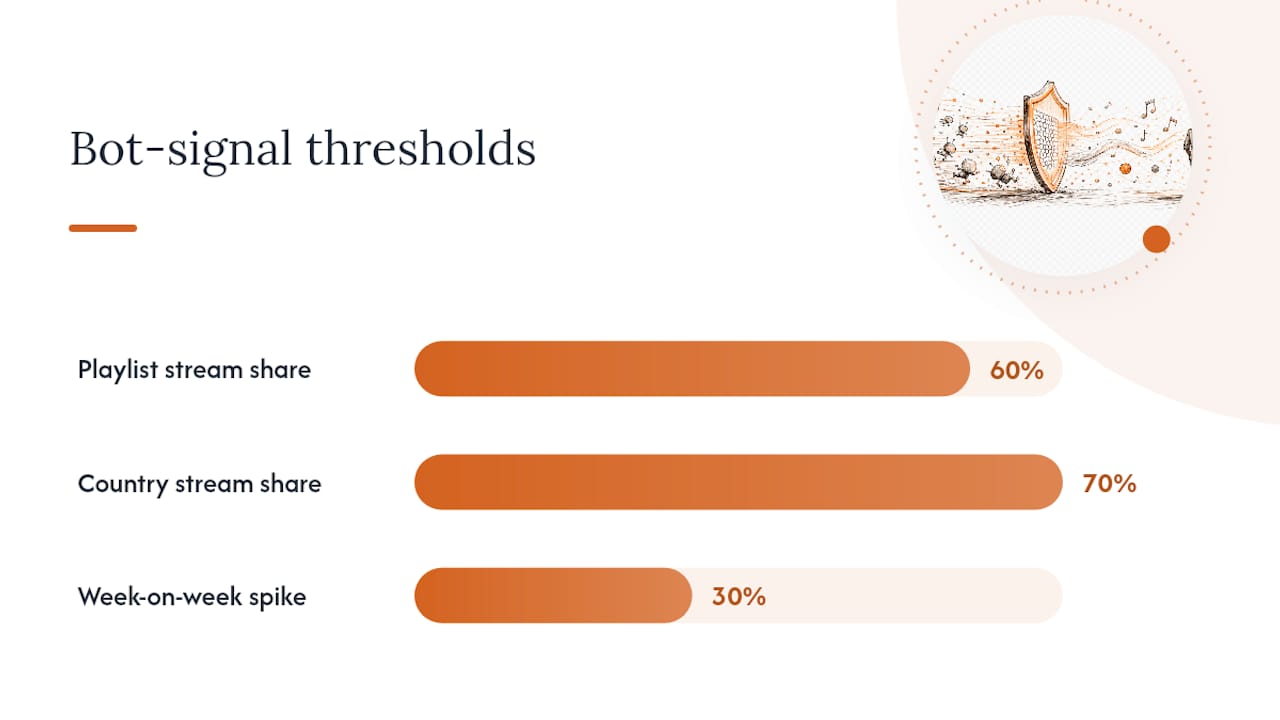
- Stream source breakdown: if a new, unknown playlist suddenly accounts for 60% of your streams, investigate it.
- Listener geography: a track that has always indexed heavily in the U.S. suddenly showing 70% of streams from a single foreign country is a classic bot signal.
- Save rate: saves divided by streams. A healthy track typically maintains a consistent save rate. A sharp drop after a stream spike means listeners (or bots) are not saving the song.
- Playlist adds vs. saves: a playlist with thousands of adds but near-zero saves per track is worth flagging.
A simple five-alert watchlist to check weekly:
| Alert | What to check | Action if triggered |
|---|---|---|
| Stream spike over 30% week-on-week | Spotify for Artists source report | Identify the playlist source; run a bot check |
| New playlist with high adds, low saves | Playlist source tab | Screenshot and run artist.tools check |
| Geographic anomaly | Listener location report | Compare to your known fanbase geography |
| Sudden save rate drop | Save/stream ratio in analytics | Check for new bot-heavy playlist traffic |
| Artist name impersonation | Web search your artist name weekly | Report to Spotify and document |
Practical automation: Chartmetric offers email alerts for playlist adds and follower changes. artist.tools can be re-run on any playlist you are tracking. A simple spreadsheet logging your weekly save rate and top playlist sources takes five minutes to maintain and makes anomalies obvious at a glance.
One structural protection that helps recovery: keeping your copyright registration current with the U.S. Copyright Office. If you ever need to file a formal complaint or pursue a legal claim, a registered copyright is the foundation.
What legitimate playlist promotion actually looks like
A trustworthy curator-based service operates transparently and delivers verifiable outcomes. Here is what you should expect, and what should concern you.
Checklist for a legitimate service:
- Named, verifiable curators with real Spotify profiles and social footprints
- Written feedback from curators on every submission, whether accepted or declined
- Genre matching: your track goes to curators who actually cover your genre
- Post-campaign reporting showing which playlists added your track, follower counts, and stream impact
- No guarantee of placement — only a guarantee that curators will listen and respond
- Clear fee structure and a stated refund or credit policy
What to read in a provider’s reporting: Saves and follows per placement matter far more than raw stream counts. Ask any service to show you save rates alongside stream numbers.
Contractual expectations: A legitimate service will not promise editorial playlist placement (that is Spotify’s decision alone), will explain its fees clearly before you pay, and will have a written policy on what happens if your campaign underperforms. Any service that guarantees a specific number of streams is selling you something Spotify explicitly prohibits.
For artists who want to see what curator-driven curation looks like in practice, Intonality’s genre-matched playlist pages show how tracks are organized by vibe and audience rather than by follower count.
Why curator quality matters more than follower counts
The industry’s default metric for playlist value is follower count, and it is the wrong one. A playlist with 500 engaged listeners who save tracks, follow artists, and share songs is doing more for your career than a 100,000-follower list where no one saves anything.
Follower counts are easy to inflate. Save rates are not. When Spotify’s algorithm decides whether to push your track into Discover Weekly or Release Radar, it is reading engagement signals — saves, playlist adds by real users, completion rates — not the raw follower number of the playlist that first exposed your song. Chasing big follower counts without vetting engagement is how artists end up with impressive-looking stream numbers and no actual fans.
The artists who build durable careers on Spotify tend to share one habit: they treat each placement as a data point, not a trophy. A placement that generates 50 new followers and 30 saves tells you something real about your audience. A placement that generates 10,000 streams and zero saves tells you the listeners were not real people.
Intonality connects you with real curators who give real feedback
Most playlist promotion services sell you a number: streams, followers, placements. Intonality sells you something more useful — direct access to vetted, genre-matched curators who will actually listen to your track and tell you what they think.
Every Intonality campaign sends personalized pitches to real curators whose playlists match your genre and audience. You get written feedback from every curator decision, whether they add your track or pass. That feedback alone is worth more than most paid promotions, because it tells you how your music lands with the people most likely to care about it. Campaigns report an average of 4 to 11 playlist placements depending on the tier, with real-time dashboard updates so you can track progress as it happens. No bots, no guaranteed placements, no pay-for-play schemes — just curator-first promotion that Spotify’s own guidelines support.
If you are ready to run a campaign that builds real streams and real fans, start with Intonality’s playlist promotion service and see which curators are the right fit for your next release.
Sources
These are the primary sources and official guidance pages referenced throughout this article.
- Artificial Streaming – Spotify for Artists
- How To Detect Fake Spotify Playlists - Symphonic Blog
- What is Artificial Streaming — DistroKid Support


