
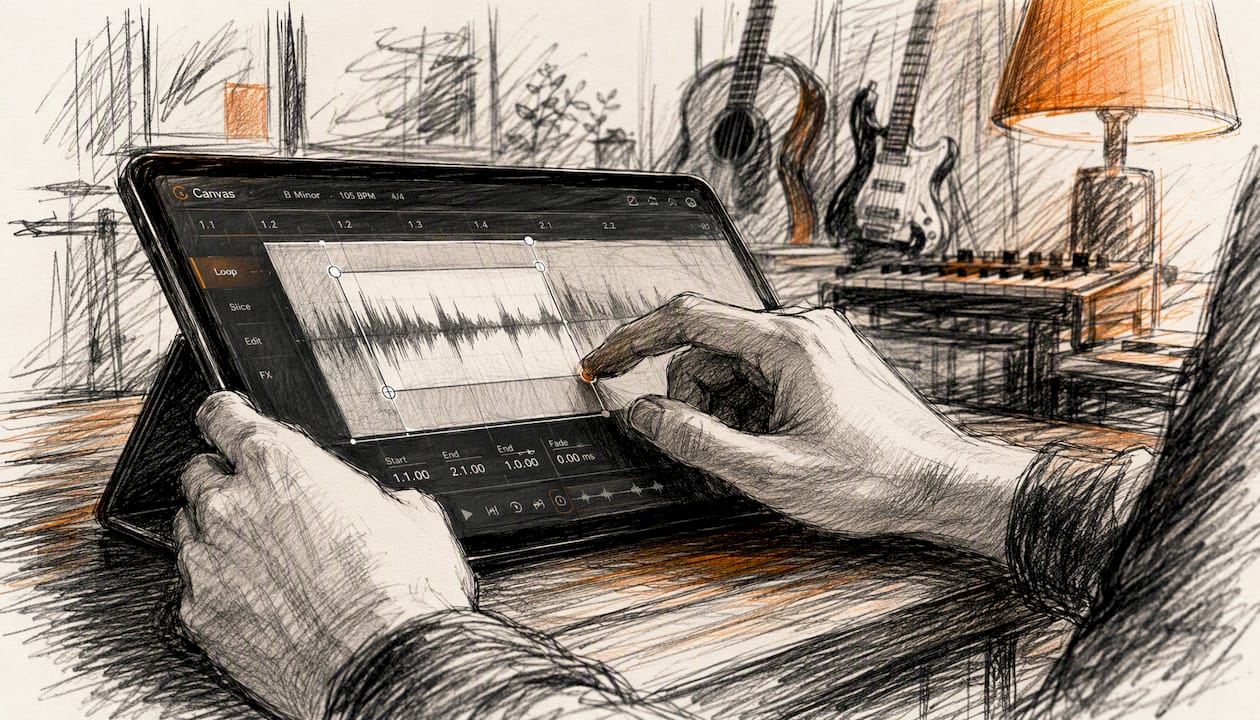
Spotify Canvas does move the needle. Spotify reports that tracks with a Canvas see roughly 145% more shares, about 5% more streams, and around 20% more profile visits compared to tracks without one. Those numbers are real, but they come with a catch: they are platform-aggregated averages, not a guarantee for every release. Artist activity, release marketing, and audience size all shape the actual outcome. Think of the figures as directional signals, not a formula.
145% more shares. ~5% more streams. ~20% more profile visits. Spotify’s own aggregated data across tracks with Canvas vs. without. Source: Spotify for Artists Canvas Metrics Guide.
The rest of this guide breaks down what those numbers actually mean for an independent artist, how to test Canvas on your own catalog, and what to do with the results.
Table of Contents
- What Spotify Canvas is and where listeners actually see it
- What the data actually says about Canvas performance
- How Canvas can indirectly influence discovery and algorithmic reach
- How to measure Canvas impact on your own tracks
- How to upload Canvas and the technical rules you need to follow
- How Canvas fits into a broader release and promotion strategy
- Key Takeaways
- The case for Canvas is real, but the priority order matters
- Intonality turns Canvas engagement into playlist reach
- Useful sources and further reading
What Spotify Canvas is and where listeners actually see it
Canvas is a 3–8 second looping vertical visual that replaces static cover art in the mobile Now Playing view. When a listener plays your track on their phone, your Canvas loops silently behind the playback controls. It is not a music video. It is closer to a moving album cover.
Where Canvas appears and what it can do:
- Spotify for Artists analytics — views (impressions) are tracked as a distinct metric you can monitor.
- Not on desktop or web player — Canvas is mobile-only. Listeners on a laptop or smart speaker will never see it.
Canvas directly reports one metric: views. Everything else (shares, saves, profile visits, streams) is influenced indirectly. A listener who sees your Canvas might share the track, visit your profile, or save it — but the Canvas itself does not force any of those actions.
One more thing worth knowing: some listeners can disable Canvas in app settings, and the toggle’s availability varies across app versions. Not every listener who plays your track on mobile will see your Canvas. Design and measurement plans should assume partial visibility.
What the data actually says about Canvas performance
Spotify’s headline numbers are the most-cited figures in any Canvas conversation, so it is worth being precise about what they represent.
| Metric | Spotify-reported lift | What it means in practice |
|---|---|---|
| Shares | ~145% more | The biggest and most consistent effect; shares push your track to new listeners organically |
| Streams | ~5% more (on average) | A modest absolute bump; larger in percentage terms for tracks with small baselines |
| Profile visits | ~20% more | Strategically valuable — profile visits can convert to follows and Release Radar reach |
| Saves | up to ~114% more (Spotify highest reported figure) | Reported in select Spotify materials; treat as a ceiling, not a floor |
The share lift is the most practically useful number here. A 145% increase in shares means your track reaches listeners who never searched for you — that is organic distribution, not just replays from existing fans.
Spotify’s figures are platform-aggregated and not independently audited. The methodology is not fully published, which means you cannot know how much of the lift comes from Canvas itself versus the fact that artists who use Canvas tend to be more active promoters overall. That is the correlation-vs.-causation problem in one sentence.
For an independent artist with 500 monthly listeners, a 5% stream bump is a handful of plays. For an artist with 50,000 monthly listeners, it is 2,500 extra streams. The percentage is the same; the absolute impact is not. Spotify encourages artists to track Canvas views alongside standard streaming metrics and to iterate, because every Canvas performs differently.
Spotify has positioned Canvas as a catalog-wide tool, not just a launch-day asset. That framing matters: even older tracks can get a second look if you add a Canvas and push it on socials.
How Canvas can indirectly influence discovery and algorithmic reach
Canvas does not plug directly into Spotify’s recommendation algorithm. The effect is indirect, and it works through a behavioral chain:
- Canvas → Shares — a listener shares your track to Instagram Stories, exposing it to their followers.
- Shares → Profile visits — some of those new listeners tap through to your Spotify profile.
- Profile visits → Follows — a percentage of profile visitors follow you.
- Follows → Release Radar — new followers receive your next release in their Release Radar playlist, which is Spotify’s most reliable algorithmic delivery channel for new music.
That chain is probabilistic, not automatic. But the share lift is the entry point, and it is the metric where Canvas shows the largest effect. Profile visits are the strategic middle step — they are where passive listeners become followers, and followers are the audience that compounds over time.
A few practical limits: Canvas is mobile-only, so the entire chain depends on your listeners using the Spotify mobile app. And because some listeners disable visual features (partly due to battery and data concerns), the reach is always partial.
To give Canvas the best chance of feeding discovery:
- Pair Canvas with a Spotify for Artists playlist pitch at release — playlist placement drives the listener volume that makes Canvas visible.
- Push your Canvas to Instagram Stories and TikTok at release, timing posts for when your audience is most active. Research on posting timing and audience behavior suggests late evening posts often outperform daytime ones for music content.
- Update Canvas on a track when you are actively promoting it, not just at release. A fresh visual gives returning listeners something new.
How to measure Canvas impact on your own tracks
Spotify’s platform averages tell you what happened across millions of tracks. Your own data tells you what happens for your audience. Here is a simple measurement playbook.
Step-by-step method:
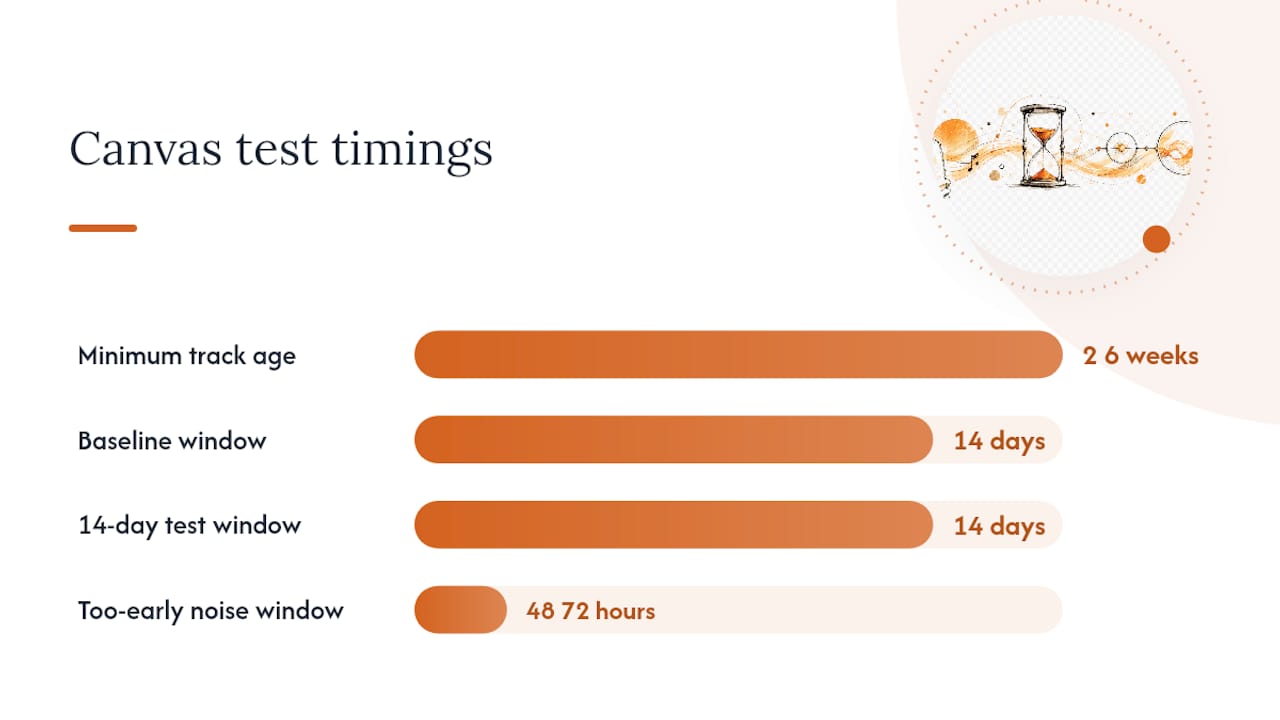
- Pick a track that has been live for at least 2–3 weeks with no Canvas. Record its baseline: streams, saves, profile visits, and follower count for the past 14 days.
- Upload a Canvas. Note the exact date.
- Run a 14-day test window with no other major promotional changes.
- Pull the same metrics from Spotify for Artists and compare. Focus on shares and profile visits first — those show the clearest Canvas signal.
Where to find the metrics in Spotify for Artists:
- Views — Canvas-specific; found in the track’s stats page under “Canvas.”
- Streams, saves, listeners — standard track analytics.
- Profile visits — found in your audience stats.
- Follower growth — check your profile stats week over week.
A/B-style options for independent artists:
| Test type | How to run it | Best for |
|---|---|---|
| Before/after on one track | Baseline window → add Canvas → test window | Solo artists with limited catalog |
| Parallel tracks | Release two similar tracks, one with Canvas | Artists releasing EPs or batches |
| Campaign split | Add Canvas to half your active tracks, leave half without | Artists with a back catalog of 10+ tracks |
Realistic expectations: the share and profile visit differences tend to be more visible than the stream bump for artists under 10,000 monthly listeners. Spotify recommends iterating on Canvas visuals rather than treating the first upload as final — if views are high but shares are flat, the visual may not be compelling enough to prompt sharing.
Pro Tip: Set a calendar reminder for 14 days after every Canvas upload. Checking metrics too early (within 48–72 hours) gives you noise, not signal. Two weeks of consistent data is the minimum for a meaningful read.
How to upload Canvas and the technical rules you need to follow
Upload steps in Spotify for Artists:
- Log into Spotify for Artists and go to your music library.
- Select the track you want to add a Canvas to.
- Click “Edit” and navigate to the Canvas section.
- Upload your file and preview the loop.
- Save and publish. Canvas typically goes live within a few hours.
Technical specs:
- Aspect ratio: 9:16 vertical
- Length: 3–8 seconds
- Recommended formats: MP4 or JPG (for still animations); MP4 is standard for video loops
- File size: under 10 MB
- Resolution: 720p minimum; 1080p preferred
- Composition: keep key visual elements in the center-safe zone (avoid the outer 10% on all sides)
Content policy — what will get your Canvas rejected or removed:
- Explicit or graphic content not flagged appropriately
- Trademarked logos or branded content you do not own
- Flashing imagery that violates epilepsy safety standards
- Promotional text or pricing information (Canvas is not an ad unit)
Confirming your Canvas is live:
- Open the Spotify mobile app on your phone and play the track. If the Canvas appears, it is live.
- Check Spotify for Artists after 24–48 hours — views will begin populating once listeners start playing the track on mobile.
Troubleshooting: if your Canvas is not showing, check that the file meets the spec requirements and that the track is fully distributed. Canvas availability can also vary slightly by app version.
How Canvas fits into a broader release and promotion strategy
Canvas is an engagement asset. It does not replace a release strategy — it amplifies one. An artist who uploads a Canvas and does nothing else will see modest results. An artist who uploads a Canvas as part of a coordinated release gets the full behavioral chain working.
A practical release coordination checklist:
- At release: — upload Canvas on the same day the track goes live. Pitch the track through Spotify for Artists at least 7 days before release so editorial consideration and Canvas are aligned.
How your Canvas visual matches the emotional arc of your track matters more than production quality. A phone-shot clip that captures the right mood will outperform a polished visual that feels disconnected from the song.
Pro Tip: Use the profile visits Canvas generates as a signal for your next curator pitch. A track with rising profile visits and shares is a stronger pitch than a track with streams alone — it shows listener intent, not just passive plays.
Spotify has made Canvas available across catalog, not just new releases. That means you can add Canvas to older tracks during a campaign push, a sync placement, or a social moment — and measure whether the visual extends the track’s life. Understanding your Spotify for Artists analytics before and after that push is how you know whether it worked.
Key Takeaways
Canvas is most valuable as a share-driver: the significant share lift is the metric that introduces new listeners, and it compounds when paired with playlist placement and social promotion.
| Point | Details |
|---|---|
| Share lift is the main event | Spotify reports significantly more shares for Canvas tracks; shares reach new listeners organically. |
| Stream bump is modest | The average stream lift is modest and matters more at higher listener volumes; expect small absolute gains early on. |
| Measure with a 14-day window | Baseline before upload, test after, compare shares, profile visits, saves, and follower growth in Spotify for Artists. |
| Design for atmosphere, not information | Avoid text, flashing effects, and edge-heavy compositions; keep motion subtle and loop points invisible. |
| Intonality amplifies Canvas gains | Playlist placements through Intonality drive the listener volume that makes Canvas shares and profile visits compound. |
The case for Canvas is real, but the priority order matters
Canvas is worth doing for most singles. The share lift alone justifies the 10–30 minutes it takes to cut a loop from existing footage, and the profile visit bump gives you a second conversion opportunity you would not otherwise have. For a new single with a strong hook or a visual moment in the song, Canvas is a straightforward yes.
Where I would deprioritize it: back-catalog tracks with no current audience and no active promotion. A Canvas on a track nobody is playing does not generate views, shares, or profile visits. The feature only works when listeners are already arriving. Adding Canvas to a dormant track without a corresponding push is effort spent on a closed loop.
The resource allocation question is the one most independent artists get wrong. Canvas is not free in the sense that it takes time, and time is the scarcest resource for a solo artist. If you are choosing between finishing a Canvas and submitting your track to curators before the Spotify for Artists pitch deadline, submit the track first. Playlist placement drives the listener volume that makes Canvas visible. Canvas then amplifies what that volume does. The order matters.
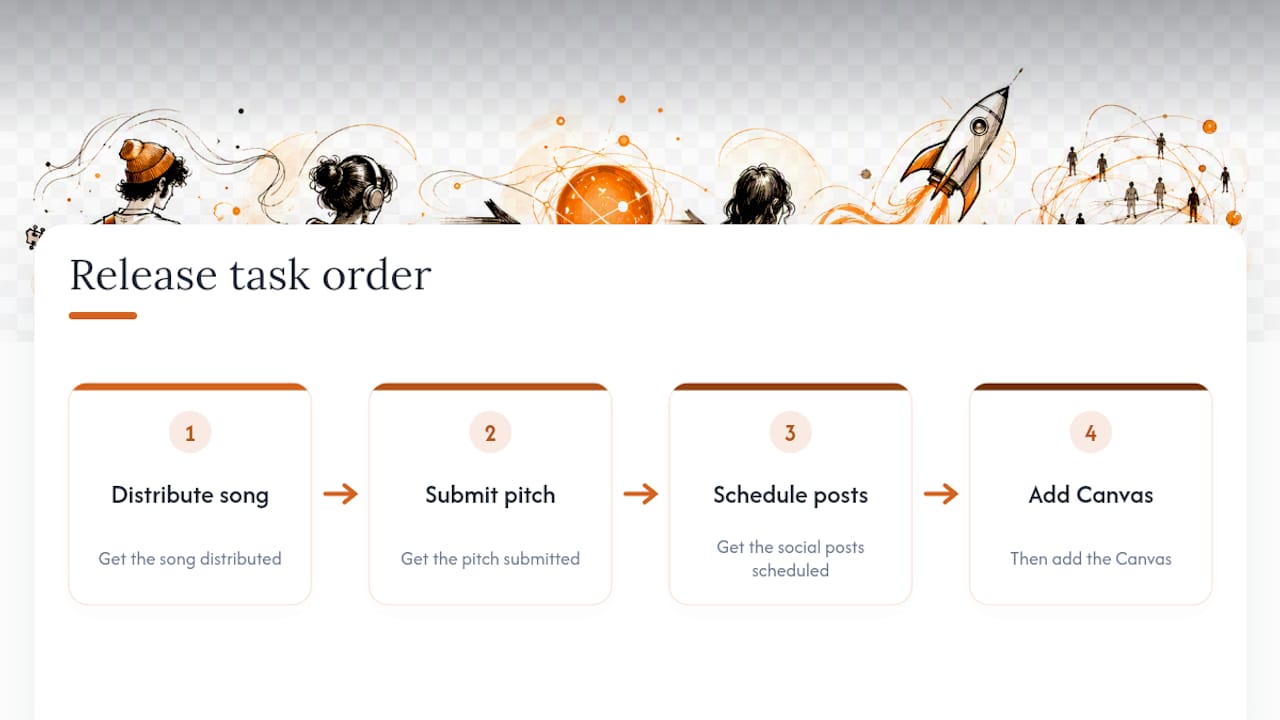
The artists who get the most from Canvas are the ones who treat it as the last 10% of a release, not the first. Get the song distributed, get the pitch submitted, get the social posts scheduled — then add the Canvas. In that sequence, it earns its keep.
Intonality turns Canvas engagement into playlist reach
Canvas drives shares and profile visits. What it cannot do is put your track in front of listeners who have never heard of you. That is where Intonality’s playlist promotion comes in.
Intonality pitches your track directly to vetted, genre-matched curators — real people who decide whether your music fits their playlist, and who send written feedback on every decision. The average campaign results in 4–11 playlist placements depending on the tier, and every placement is a new pool of listeners who can see your Canvas, share your track, and visit your profile. That is the combination that makes the behavioral chain from Canvas to follower actually work at scale.
You can submit your track to Intonality before your release date, which means your Canvas and your playlist placements can go live together. Results vary by genre, track, and campaign tier — use the measurement framework in this guide to track what changes.
Useful sources and further reading
Official Spotify for Artists documentation:
- Canvas Metrics Guide – Spotify for Artists
- Canvas – Spotify for Artists
- Using Canvas: Top Tips On How to Engage and Attract Fans With Short, Looping Visuals – Spotify for Artists
- Canvas: Your Art Has the Power to Move – Spotify for Artists
- Spotify Canvas Streams Uplift: What Spotify’s Own Data Says About Canvas Performance in 2026 | Echonos
- Solved: Canvas toggle option off not available - The Spotify Community
- I turned off a few default Spotify settings and my battery life … - MUO
Independent analysis:
- Spotify Canvas Streams Uplift – Echonos — third-party interpretation of Spotify’s headline numbers; explains methodology limits and how to read percentage lifts against your actual baseline. Independent, not affiliated with Spotify.
Community troubleshooting:
- Canvas toggle option not available – Spotify Community — community thread on the listener-side Canvas toggle and app version variability. Useful if listeners report not seeing your Canvas.
- Turning off Spotify visual settings and battery life – MUO — consumer tech writeup on why some listeners disable visual features; relevant context for why Canvas reach is always partial.


